Beyond Bids: Mastering Google’s Advertising Ecosystem
Navigating the Core Ecosystem: Google Ads vs. Google Ad Manager vs. Google Marketing Platform
To build a reliable digital strategy, you must first understand the three distinct pillars of Google’s advertising landscape. While many advertisers use the terms interchangeably, each platform serves a unique function in the broader digital marketplace.
Google Ads is the primary buy-side platform for businesses of all sizes. It allows advertisers to bid on keywords, display visual banners, run video placements, and showcase e-commerce products.
Monetization and Enterprise Ads Engine
On the publisher side sits Google Ad Manager – Integrated Advertising Management Platform. While Google Ads helps you purchase traffic, Google Ad Manager is an integrated monetization tool built for digital content creators, news publishers, and app developers to sell their direct and programmatic ad inventory.
When your Google Ads campaign targets the Display Network, it automatically bids in real-time auctions for available impression space hosted on Google Ad Manager publisher sites. Through this exchange, publishers maximize their ad revenue while advertisers gain access to premium digital real estate across the web.
Centralizing Search and Analytics Platforms
For large enterprises and sophisticated marketing teams, Google Marketing Platform bridges the gap between media buying and deep analytics. By bringing together Search Ads 360, Display & Video 360, Campaign Manager 360, Google Analytics, and Tag Manager into a single environment, enterprise teams can manage multi-channel media buys and view real-time customer touchpoints concurrently.
When building out your broader marketing approach, creating a solid digital marketing strategy requires choosing the right mix of these tools based on whether your immediate need is direct customer acquisition, programmatic scaling, or complex data integration.
Streamlining Multi-Account Google Advertising Management with Manager Accounts (MCC)
Managing individual ad accounts with separate logins creates friction, fragmented reporting, and administrative headache. A Google Ads Manager Account—historically known as My Client Center (MCC)—acts as a centralized umbrella dashboard that streamlines multi-account governance.

Setting Up and Linking Accounts in Google Advertising Management
Whether you are an agency overseeing client portfolios or an enterprise managing distinct sub-brands, setting up a manager account allows you to oversee budgets, compare performance, and adjust campaigns across multiple sub-accounts without logging in and out of different profiles.
To link an existing Google Ads account:
- Log into your manager account dashboard.
- Navigate to Accounts > Sub-account settings.
- Click the blue + button and select Link existing account.
- Enter the 10-digit Customer ID of the child account.
- Send the link request and approve it within the child account’s access settings.
Understanding how Google Ads Manager streamlines your business is critical when scaling your operations. A single email address can be associated with up to 20 individual Google Ads accounts, but consolidating them under an MCC unlocks cross-account automation and unified reporting that individual logins cannot match.
Access Control, Permissions, and Consolidated Billing
Security and administrative control are foundational to professional account governance. Within a manager account, you can grant granular access levels (such as Read Only, Standard, Administrative, or Email Only) tailored to team roles.
Furthermore, manager accounts unlock consolidated billing. Rather than managing dozens of credit card statements or individual payment profiles, qualifying accounts can group child accounts into a single monthly invoice tied to a central payments profile.
Choosing the Right Campaign Types and Tracking Infrastructure
Google Ads offers specialized campaign formats tailored to different user touchpoints and intent levels across the buyer journey.

Matching Campaign Intent to Business Goals
Selecting the appropriate campaign type ensures your budget targets users with the right level of intent:
- Search Campaigns: Capture active demand by displaying text ads when prospective buyers explicitly search for your products or services.
- Display Campaigns: Build visual brand awareness and retarget past visitors across millions of websites and apps using standard IAB banner formats.
- Shopping Campaigns: Showcase physical products with images, prices, and store names directly in search results by syncing a Google Merchant Center feed.
- Video Campaigns: Engage audiences on YouTube and video partners using skippable or non-skippable ad formats to drive consideration and conversions.
- App Campaigns: Automate app installation drives across Search, Google Play, YouTube, and Discover.
- Demand Gen Campaigns: Leverage image and video ads across YouTube Shorts, Discover, and Gmail to generate early-funnel interest.
- Performance Max (PMax): Drive conversions by deploying Google AI and Smart Bidding to automatically serve ads across all Google inventory channels from a single campaign.
When conducting end-to-end media execution, working with a structured guide to media buying services ensures your campaign formats closely mirror your overarching marketing objectives.
Tag Configuration and Conversion Tracking Precision
Flawless technical tracking is non-negotiable for modern AI-driven bidding algorithms. Proper management requires configuring your site-wide tag settings accurately through official documentation on how to configure your Google tag settings.
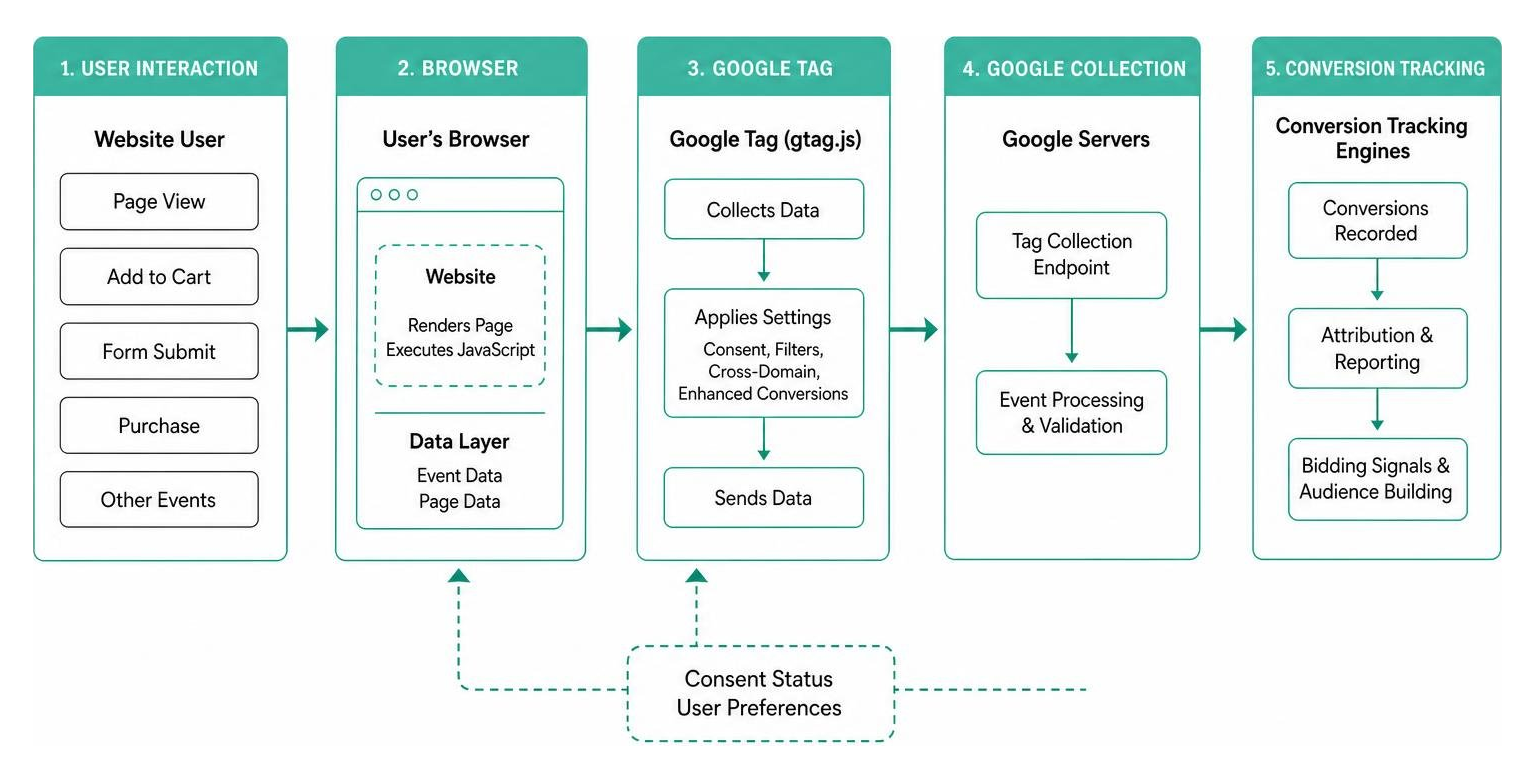
Key technical setup requirements include:
- Cross-Domain Measurement: Pass linker parameters (
_gl) across separate domain checkout flows to preserve user session continuity. - Enhanced Conversions: Securely hash user-provided first-party data (such as email addresses) to recover conversion attribution lost due to browser privacy restrictions.
- Consent Mode Settings: Implement default consent rules to adjust tag behavior dynamically based on user cookie preferences in compliance with regional regulations.
- Internal Traffic Exclusions: Define IP address ranges using CIDR notation to prevent internal staff visits from skewing performance metrics.
Advanced Analytics, Automation, and Campaign Diagnostics
Data interpretation in Google Ads relies on a strict 3-tier hierarchy: Account, Campaign, and Ad Group. Effective google advertising management requires regular navigation through these levels to evaluate account health.
Executing Google Advertising Management via Automated Scripts and Rules
To reduce tedious manual work, advertisers can implement native automated rules or write custom JavaScript by using scripts to make automated changes.
Google Ads scripts execute client-side code to perform repetitive account changes automatically:
- Adjust keyword bids dynamically based on real-time impression volume or weather API data.
- Scan landing page URLs to flag broken links (404 errors) across sub-accounts.
- Automatically pause low-stock e-commerce items by referencing external inventory feeds.
Single-account scripts carry a maximum execution limit of 30 minutes (60 minutes for manager accounts) before timing out, and any automated actions taken by scripts cannot be undone in bulk.
Harnessing Insights and Recommendations for Optimization
Inside the interface, the Insights page surfaces macro market trends and emerging search terms, while the Recommendations page provides a calculated Optimization Score (Optiscore).
Applying relevant recommendations helps maintain strong account health, but automation should always be paired with human strategic oversight. Reviewing targeted media planning tips for small businesses ensures automated budget adjustments align with real-world financial capacity.
Additionally, when metrics fluctuate unexpectedly, you can hover over underlined performance metrics in the interface to launch the built-in Explanations feature for instant root-cause analysis.
Legal, Policy, and Brand Safety Compliance
Running a clean ad operation requires strict adherence to Google Ads policy guidelines and regulatory standards. Google enforces rigid rules regarding restricted content categories, trademark keyword usage, and brand safety.
Google relies heavily on advanced machine learning—including Gemini AI model integration—to review creative compliance. According to recent safety reports, native AI systems catch and filter over 99% of policy-violating ads before publication, leading to billions of blocked ads and millions of suspended accounts annually.
| Audit Method | Execution Speed | Scope of Protection | Human Context & Nuance |
|---|---|---|---|
| Manual Audits | Periodic / Deliberate | High-level strategy & brand alignment | Exceptional |
| Automated Rules & Scripts | Near Real-Time | Account parameters, budgets, & system flags | Limited to pre-programmed logic |
| Google AI Policy Enforcement | Instantaneous | Policy breaches, scams, & restricted content | High accuracy on strict rules; prone to false positives |
To avoid unexpected account suspensions or ad disapprovals, ensure your landing pages are fully compliant, disallow misleading claims, and secure proper authorization when targeting branded or trademarked terms.
Frequently Asked Questions about Google Advertising Management
How do I grant external users access to a Google Ads account securely?
Navigate to Admin > Access and Security within your account. Click the + button, enter the user’s email address, and select an access level (such as Read Only, Standard, or Administrative) that grants only the minimum required permissions. Never share primary account login credentials.
What is the primary difference between Google Ads Scripts and automated rules?
Automated rules offer a simple, no-code interface within the dashboard for scheduling basic changes (e.g., pausing campaigns on weekends). Google Ads Scripts utilize custom JavaScript, allowing for much more complex logic, external API integrations, and advanced account manipulations.
Why is a manager account required for consolidated invoicing?
Google requires a manager account (MCC) to group multiple child accounts under a single unified payments profile. This allows agencies and enterprise organizations to merge spending across distinct sub-accounts into one monthly invoice.
Mastering Google Advertising with McGuinness Media & Marketing
Managing a modern ad program requires a balance of creative vision, precise technical measurement, and strategic campaign governance. From managing multi-account hierarchies to setting up cross-domain tagging and optimizing AI bidding strategies, success lies in building an integrated, repeatable system.
At McGuinness Media & Marketing, we help businesses cut through digital complexity to build ad programs that scale efficiently and deliver measurable growth. Explore our full suite of digital marketing services to see how our team can optimize your ad ecosystem today.